Nov 21, 2008  Welcome, Guest [ login  English US [ change ]  

SEARCH
Advanced search

SITE OPTIONS
Print this page
E-mail this page
Newsletter sign-up
Add to Learning List

CERTIFICATIONS
Microsoft Certified Partner
Microsoft .NET Connected
Certified IMS Developer
HR-XML Consortium Certified
AICC Certified
what this means...

 
Questionmark Perception Reporting Reporting and Analytics

Reporting and Analytics

Overview

Questionmark Perception's Enterprise Reporter provides secure access to twelve report types including:

Filters for dates, date ranges, participant names, special (demographic) fields, topics, and assessments, can be applied so that you view the information you need.

In addition to these report types the Perception answer database is documented in order to allow third party reporting programs access the results if they have been configured with sufficient security by the system administrator. Results can also be extracted using a series of APIs known as QMWISe.
more information about QMWISe...


Questionmark Perception reports
Browser-based reporting offers twelve report types including:

  • Coaching Report: Allows you to select a single participant and assessment, and then see detailed information, including the answers and scores for each question. The information contained within this report helps coach individuals through their learning curves.
    View example of Coaching Report
    • Benefits:
      • Help participants understand assessment results in detail
      • Provide one-on-one feedback that guides learning and remediates knowledge gaps
      • Customizable filters, labels, layout and design to enable meaningful analysis and communication of results.
      • Distribution via browser, email, PDF, Word, Excel and print.
      • Batch processing to rapidly create groups of reports based on administrator-defined filter criteria.
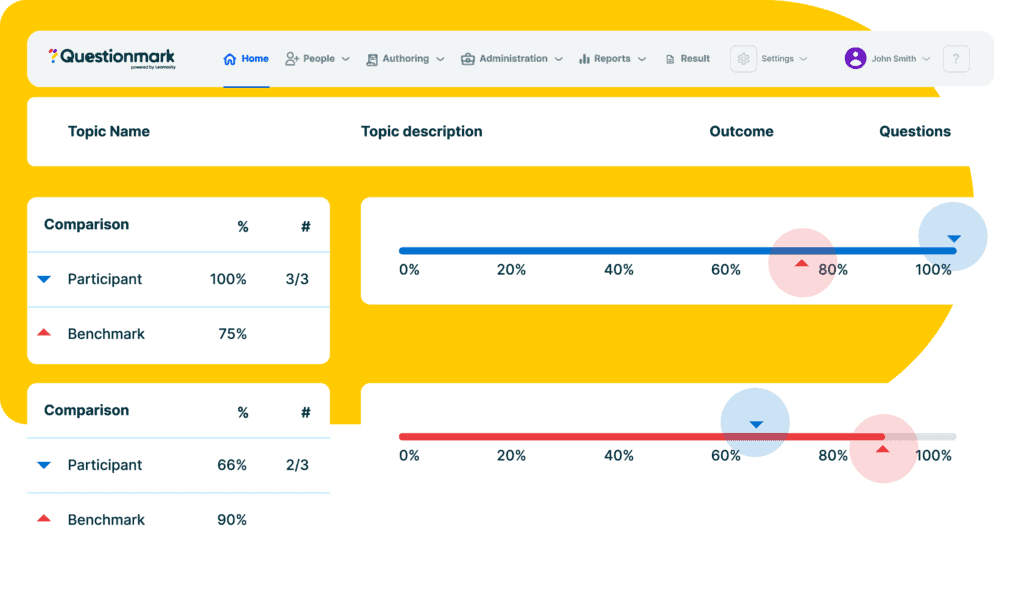
      • Graphs a participant’s performance in relation to administrator-defined benchmarks and group averages
  • Question Statistic Report: Select an assessment or topic and see an analysis of scores and outcomes to these questions, including calculating the difficulty and correlation of questions.
    • Benefits:
      • Analyze question results by assessment or topic
      • Understand which questions are more or less difficult, and which ones correlate well to assessment scores
      • Calculate item difficulty, correlation, maximum score, mean score and correlation
  • Assessment Overview Report: See how many people have taken each assessment and see the average scores, time to complete the assessment, and other useful statistics.
    • Benefits:
      • Obtain a broad analysis of results from one or more assessments
      • Break down results by group
      • Reports average scores and displays histograms of results. 
  • Survey Report: See a graphical analysis of answers to questions, frequency analysis for multiple choice, and a listing of answers for text questions. Insert and delete question "reportlets" on the fly. Choose from a variety of formatting options. Publish your reports to a browser, printer, PDF document, Word document, or Excel.
    Click to view animated feature tour.
    • Benefits:
      • Discover and share the meaning hidden within your survey results
      • On-demand cross tab and trend analysis
      • Distribute reports via HTML email, PDF, Word documents or Browser
      • create a report once, save it, and run it multiple times
  • Score List Reports: See a list of results for an assessment in score order. This report has been designed so that you can copy and paste the results into Excel, or any other Microsoft Office application.
    • Benefits:
      • Quickly review and analyze all results from a single assessment together
      • Easily share by pasting into Word or Excel


  • Transcript Report: Shows the results of assessment for a single participant.
    • Benefits:
      • Provides participants an overview of their performance over multiple assessments.
      • Get a high level view participant’s knowledge and skills.
         
  • Grade Book Report: View and calculate final grades based on several assessments. This report includes the feature to weight individual test scores to contribute more or less to the final grade.
    • Benefits:
      • Quickly and accurately calculate final grades based on multiple assessment results
      • lexible controls enable instructors to assign specific weights to each assessment
         
  • Gap Report: Compare different groups of participants, the same group at different time, or groups against standard scores, to determine the differences achieved at a question, topic or assessment level.
    • Benefits:
      • Identify and address learning needs by group or individuals
      • Track and analyze performance over time
      • Analyze impact of learning initiatives
  • Item Analysis: Provide psychometricians the tools they need to analyze question results in depth. This report displays histograms and statistics showing distribution of discrimination, correlation, p-value, difficulty, outcome frequency, participant mean, times occurred (frequency), proportion selected, upper group selection, lower group selections, outcome discrimination, outcome correlation, mean of P value, proportion correct, mean of item discrimination, and mean of item total correlation.
    • Benefits:
      • Conduct in-depth analysis of question results
      • Obtain data critical to creating valid, reliable high-stakes exams
      • Histograms and statistics to quickly drill down to information you need
         
  • Test Analysis Report: The Test Analysis Report presents detailed information regarding the statistical/psychometric performance, including the reliability, of an assessment. In short, the Test Analysis report helps administrators ensure that a test is reliably measuring what is was designed to measure. Statistical analysis in the Test Analysis Report includes: Reliability (Cronbach’s Alpha); Skew; Kurtosis; Mean (arithmetic); Median; Mode; Standard Deviation; Variance; Standard Error of measurement; and Standard Error of the Mean. The report also presents the distribution of tests scores using a frequency distribution table and a histogram that graphically displays the range of scores.
    Overview of Test Analysis Report (Slides - PDF)
    Test Analysis Report Guide (Manual - PDF)
    • Benefits:
      • Helps ensure that a test reliably measurs what is was designed to measure.
      • Provides data and analysis crucial for ensuring defensibility of an assessment.
      • Calculates Cronbach’s Alpha Test Reliability - the gold standard for measuring reliability.
      • Distribution via browser, email, PDF, Word, Excel and print.
  • Export to ASCII: Allows you to export results to ASCII format files. Useful for data analysis using other tools and for archiving purposes.
    • Benefits:
      • Quickly get to your results for analsys in third-party systems
      • Export partial or complete assessment results
         
  • Export to Excel: Allows you to export results selected to Excel. Useful for additional data analysis with Excel.
    • Benefits:
      • Leverage a familiar, powerful tool to analyze and report on your results.
      • Export partial or complete assessment results


  Learn More: Evaluate:
 
Animated overview of Perception
Download
 
Animated overview of Enterprise Reporter
Attend a web seminar
         
 
Reference Material:
   
 
PDF document
Feature Comparison (PDF)    

Top of page

How useful is the information on this page?
Not at all useful
Very useful

Copyright © 1995-2008 Questionmark Corporation and/or Questionmark Computing Limited, known collectively as Questionmark. All rights reserved.
Questionmark is a registered trademark of Questionmark Computing Limited. All other trademarks are acknowledged.
Legal information and Conditions of Use - Privacy Policy